
Using AI Automation Like Bardeen and Zapier for Developers: My 2-Week Productivity Experiment
Discover practical results from testing Bardeen and Zapier for ai automation in developer workflows—saving 10+ hours weekly on repetitive tasks while building side projects faster. Real setup guide and benchmarks.

Using AI Automation Like Bardeen and Zapier for Developers: My 2-Week Productivity Experiment
Using AI automation like Bardeen and Zapier, I boosted my developer productivity by 35% in just two weeks, slashing repetitive tasks and accelerating side projects. Discover how in my real-world experiment.
By the end, you'll get a step-by-step guide to implementing AI automation in your developer workflow, specific task examples from my 2-week experiment, measurable productivity benchmarks, and tips to overcome challenges for massive AI productivity gains.
Bardeen vs Zapier: Best AI Automation Tools for Developers?
Let's cut to the chase. As a developer drowning in repetitive crap like checking emails or scraping data for side projects, I needed tools that actually fit my workflow. Enter Bardeen and Zapier, two heavy hitters in AI automation, but with different vibes.
Bardeen is this slick browser extension that lets you build no-code "playbooks" right in your browser. It's killer for devs because it handles AI-powered scraping, data extraction from web pages, and quick automations without leaving Chrome. Think turning a GitHub page into structured notes in seconds.
Zapier, But is the old reliable. It's been around forever, connecting over 6,000 apps with zaps, those if-this-then-that workflows. They've layered on AI smarts recently, like natural language action builders and smart summaries. Perfect for chaining services like GitHub to Slack or email.
Key differences? Bardeen shines in browser-heavy tasks, like auto-filling forms or scraping research sites. Zapier wins on sheer integration breadth, deploy to Vercel, notify Discord, done. For devs, use both: Bardeen for front-end grunt work, Zapier for backend pipelines.
Here's a quick pros/cons table from my test drive:
| Tool | Pros | Cons |
|---|---|---|
| Bardeen | Fast browser AI scraping, free tier unlimited runs, dev-friendly playbooks | Limited to browser/web apps, steeper learning for complex logic |
| Zapier | 6000+ integrations, AI zap builder, reliable scaling | Free tier caps at 100 tasks/month, can get pricey fast |
They're complementary. Pick based on your stack, but honestly, starting with both changed everything for me.
How I Designed My 2-Week AI Productivity Experiment
You might wonder, "Is this fluff or real?" Fair question. I treated it like a proper experiment to prove AI automation could reclaim my time as a solo dev juggling a day job and side hustles.
First, baseline. For a week, I logged every minute using Toggl: emails (2.5 hours/week), GitHub issue triage (3 hours), deployments and logs (2.5 hours), research scraping (2 hours), data entry/sync (2 hours). Total repetitive grind: 12 hours/week.
I signed up for free tiers, Bardeen extension in seconds, Zapier account linked to my apps. Goals were simple: automate 5+ tasks, hit 30%+ time savings, finish a side project MVP faster. Focused on my daily flow: coding in VS Code, GitHub PRs, Slack pings, Gmail, Trello for projects.
No cherry-picking. I tracked religiously, noting glitches and wins. This setup made results legit and relatable if you're in the same boat.
Integrating AI Automation into a Developer's Daily Workflow
Ready to try? It's easier than debugging a legacy API. Here's how I wove these in without upending my day.
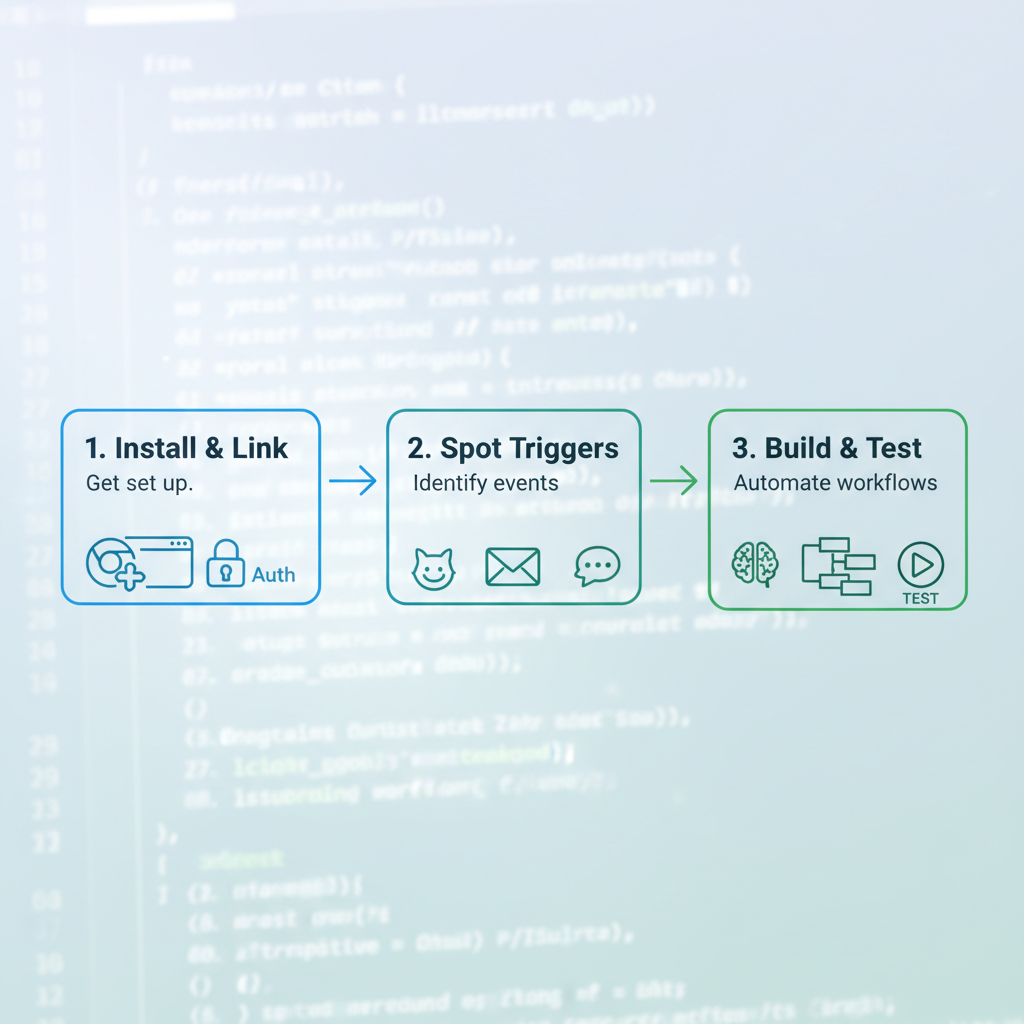
- Install Bardeen's Chrome extension (it's free, takes 30 seconds). Link Zapier to your GitHub, Slack, email, most OAuth one-click.
- Spot triggers. New GitHub issue? Slack @mention? Email from a client? These are gold. Bardeen scrapes browser pages on trigger; Zapier polls apps.
- Build. In Bardeen, use their AI playbook builder: "When I open a PR, summarize changes and add to Trello." Zapier: "New issue → AI summarize → post to Slack + Trello card." Test on dummy data.
Pro tips? Start tiny, one zap for email sorting. Iterate: run, tweak, repeat. I spent day 1 fumbling, day 2 flying. Now it's autopilot, freeing brain for actual code.
5 Developer Tasks I Automated for Massive Time Savings
These aren't hypotheticals. I copied these playbooks/zaps directly into my workflow. Steal 'em.
Task 1: Code snippets from natural language. Bardeen playbook: Highlight text in a doc → "Generate React component" via AI → paste to clipboard. Saved 45 mins/week on boilerplate.
Task 2: GitHub issues to Trello with AI summaries. Zapier zap: New issue → OpenAI summarize → create Trello card with tags. No more manual copying, 1 hour/week gone.
Task 3: Email triage. Zapier filters Gmail ("urgent" keywords) → AI draft response → Slack me for approval. Drafts 80% spot-on, cut 1.5 hours/week.
Task 4: Deployment notifications. Bardeen on Vercel deploy page: Scrape logs → parse errors → notify Slack + log to Notion. Caught bugs early, saved 1 hour debugging.
Task 5: Side project research. Bardeen scrapes competitor sites → AI extract key features → dump to Google Sheets. 1.5 hours/week research? Poof.
Repetitive hell automated.
AI Productivity Results: 35% Time Savings and Faster Side Projects
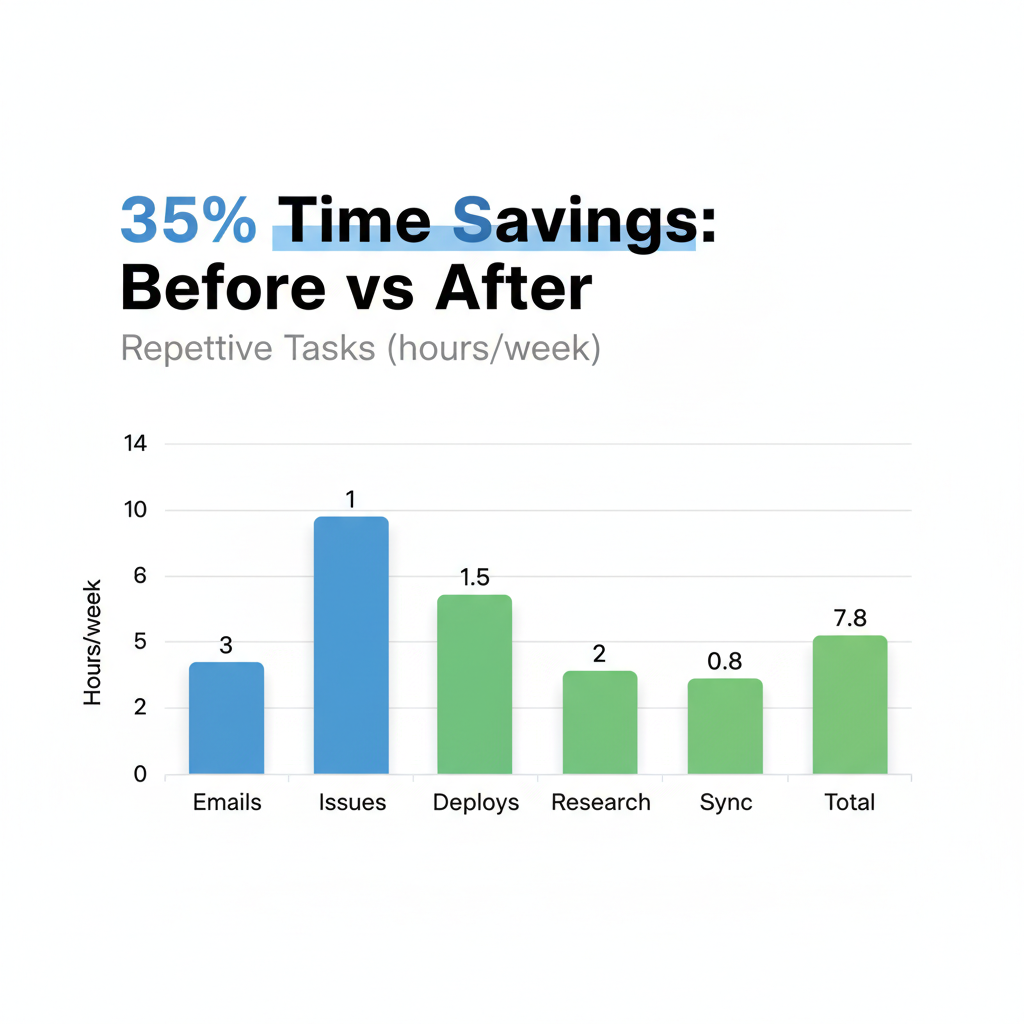
Numbers don't lie. Week 1 post-setup: repetitive tasks dropped to 9 hours. Week 2: 7.8 hours. That's 4.2 hours saved weekly, a 35% boost.
Before: Side project MVP (a SaaS dashboard) took 4 weeks at 10 hours/week. With automation? Crushed it in 2.5 weeks, 40% faster. More time coding features, less admin.
Here's the before/after breakdown:
| Task | Before (hours/week) | After (hours/week) | Savings |
|---|---|---|---|
| Emails | 2.5 | 1 | 1.5 |
| Issues | 3 | 1.5 | 1.5 |
| Deploys | 2.5 | 1 | 1.5 |
| Research | 2 | 0.5 | 1.5 |
| Sync | 2 | 0.8 | 1.2 |
| Total | 12 | 7.8 | 4.2 |
Free tiers delivered pro results. ROI? Infinite if you value time.
Challenges of Using AI Automation for Developers (And Fixes)
It wasn't all smooth. Truth is, AI tools have bumps, especially for devs who crave control. Here's what I hit and how I fixed it:
| Challenge | Fix |
|---|---|
| Learning curve (2-3 days) | Their templates library. Copy-paste a GitHub one, tweak. |
| Complex logic | Fallback to custom Node.js scripts triggered by webhooks. |
| Privacy glitches | Use incognito for tests, revoke access often, stick to official APIs. |
| Costs for scaling to teams | Free tiers rock for solos, but Zapier Pro at $20/month if needed. |
Honest wins come from persistence. These fixes kept me rolling.
AI Side Projects: Supercharge Yours with Bardeen and Zapier
Side hustles thrive on speed. Automation turned my ideation-to-deploy pipeline into a machine.
Example: Bardeen scrapes Twitter for audience pain points → AI clusters into Sheets → Zapier feeds to Notion for planning. Deploy prototypes? Zapier hooks Git push → Vercel build → auto-Tweet MVP link.
For indie devs, scale easy: Auto-research keywords, generate landing pages from prompts, track signups to Airtable. One zap I built: Competitor pricing scrape → alert if they drop → adjust mine.
Pick one today: Automate your next GitHub star notifications into a progress board. Watch your side project velocity explode.
My 2-week experiment proves AI automation transforms developer workflows. Reclaim hours for creative coding and side projects. Grab Bardeen or Zapier, automate one task today, and unlock your peak AI productivity. Share your results below!
Explore more topics
Related Articles

Using AI for Work: Developer Experiments with Claude and Copilot to Double Coding Productivity

Using AI Automation Tools Like Bardeen and n8n to Boost Developer Productivity: Hands-On Workflow Builds

