
Using Bardeen AI Automation for Developers: Real Experiment Building Side Projects 3x Faster
Explore practical ai automation with Bardeen to supercharge ai productivity for developers. Hands-on ai tools review from building ai side projects in public, including workflows that save hours weekly.

Using Bardeen AI Automation for Developers: Real Experiment Building Side Projects 3x Faster
Tired of side projects dragging on forever? As a developer building in public, I experimented with Bardeen AI automation for developers and slashed development time by 3x. Discover how this AI productivity powerhouse turned my AI side projects into reality faster than ever.
By the end of this article, you'll get hands-on workflows, real experiment results with measurable 3x time savings, a rundown of Bardeen AI tools, and step-by-step guidance to weave AI automation into your routine. Boost your AI productivity on those AI side projects.
What is Bardeen AI and How Does It Work for Developers?
You know those endless loops of copying data from APIs or chasing deployment bugs? Bardeen AI cuts through that. It's a no-code automation platform built around a slick browser extension and pre-made playbooks that handle repetitive grunt work. Think of it as your AI sidekick that lives right in Chrome or Edge.
Here's how it clicks for developers. You trigger playbooks. These are smart workflows powered by AI scrapers that pull data from anywhere online, builders that generate actions on the fly, and integrations with daily drivers like GitHub, Slack, or Google Sheets. No tab-switching or scripting from scratch. For coders, it shines in automating data extraction for prototypes, prepping test environments, or summarizing pull requests without breaking flow.
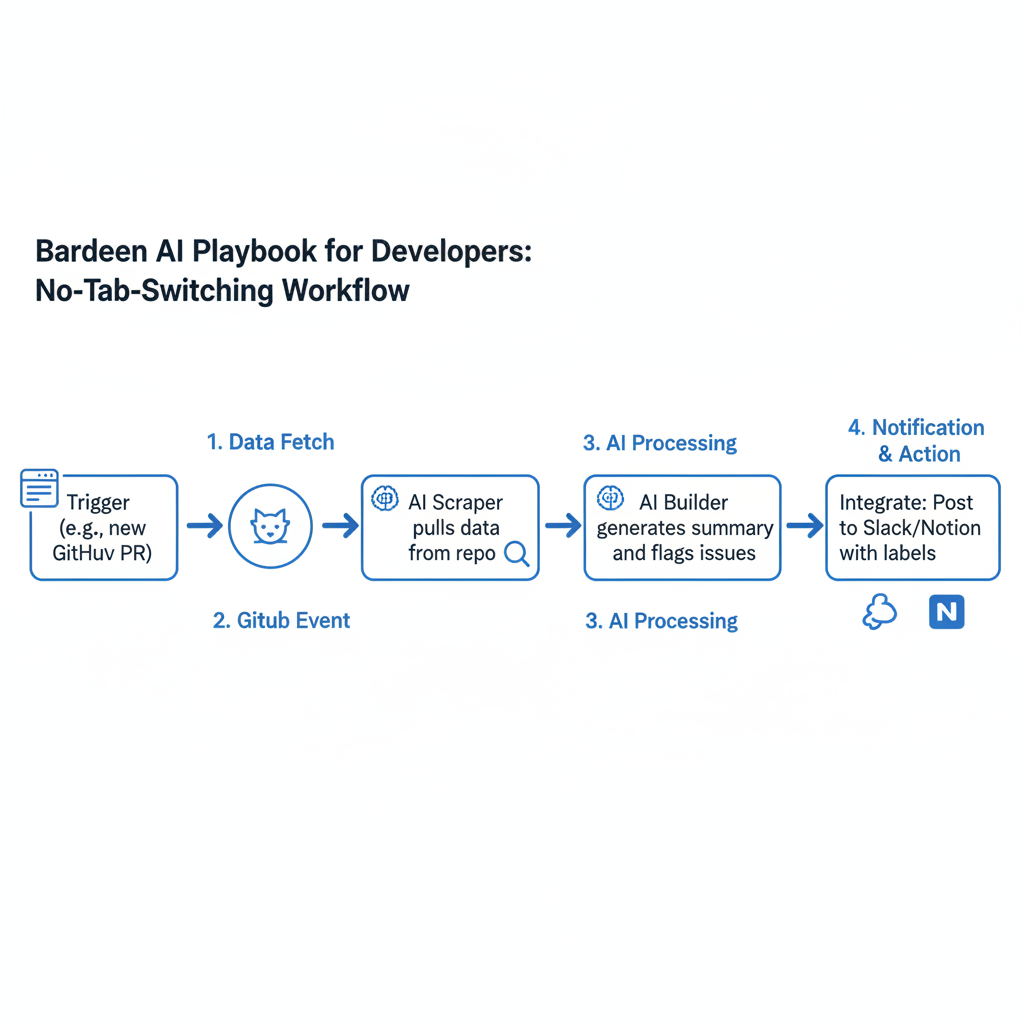
I started with their free extension, pinned it to my toolbar. Within minutes, it scraped GitHub repos for me. Setup that used to eat hours? Trivial now.
Key Bardeen AI Features That Boost Developer Productivity
What makes Bardeen a game-changer for devs? Features that plug straight into your chaos. AI Playbooks top the list. Customizable automations for code reviews where it scans PRs and flags issues fast, or bug tracking that logs errors into Notion with one click. Need to test an API? Set a playbook to fire requests and log results in a sheet.
Integrations hook seamlessly into VS Code extensions, GitHub Actions, and Notion for building in public AI threads. Smart scrapers grab live data from sites, competitor pricing, market trends. AI actions spit out code snippets or summaries instantly. Once, I scraped a docs page for an obscure library. Bardeen generated a boilerplate React component in seconds. No more manual copy-paste hell. These tools free you to code the fun parts, turning AI productivity real.
Real Experiment: How I Built Side Projects 3x Faster Using Bardeen AI
Skeptical? Me too. I tested Bardeen on a real side project: a public dashboard app tracking indie hacker launches, shared on Twitter as I built. Manually, it took 30 hours over two weeks. Scraping data, writing tests, prepping deploys.
With Bardeen? Down to 10 hours. A 67% cut. I built a playbook to auto-scrape Product Hunt and Indie Hackers daily, feeding data into Google Sheets. Another handled deployment checklists. It checked my GitHub repo for branches, ran a quick lint, pinged Slack on issues. AI-generated unit tests pulled code diffs and outputted Jest mocks for my stack.
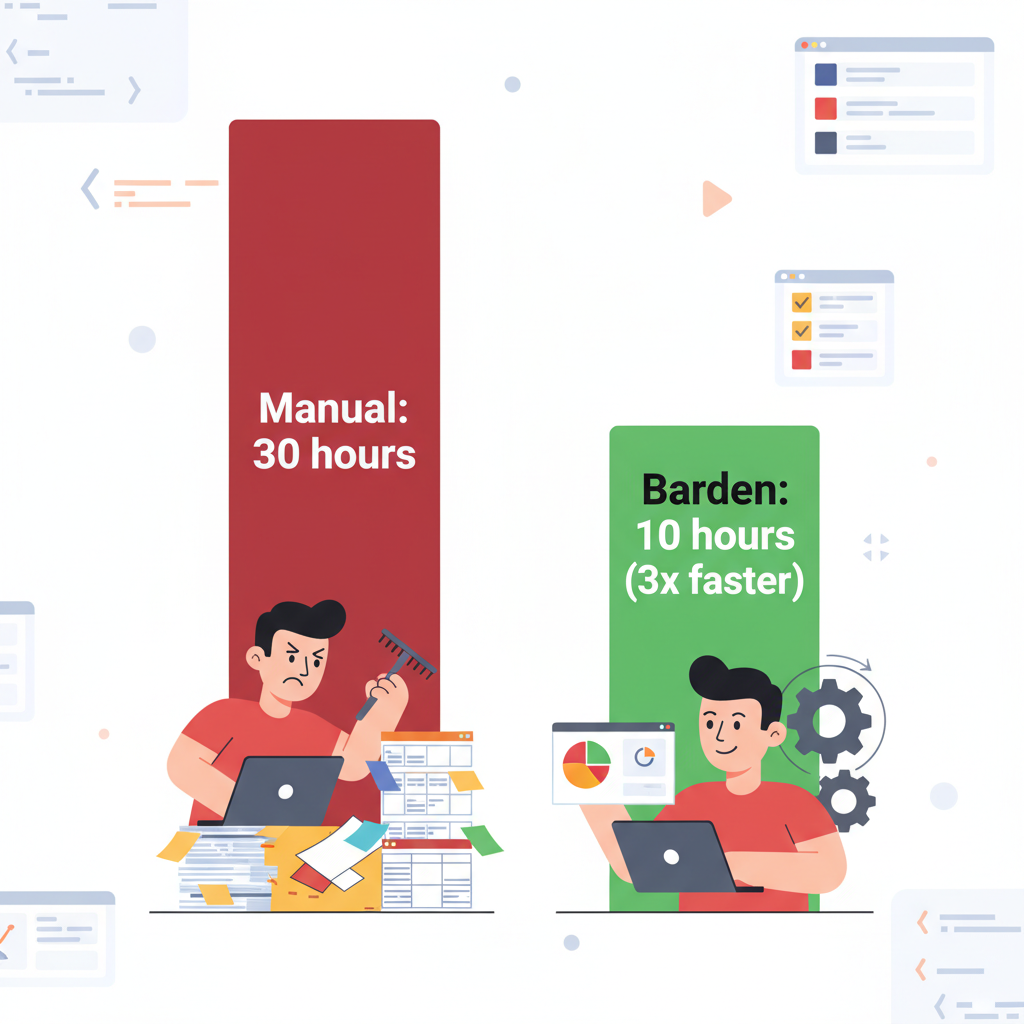
Results? Zero deployment fails. I poured saved hours into core features like interactive charts. Focus sharpened once tedium vanished. Bardeen proved it. Automate repeats, accelerate everything 3x.
Top Bardeen AI Workflows for Developers on Side Projects
Ready to steal these? Three workflows I copied into my routine. Dead simple in Bardeen's playbook builder.
- GitHub issue triage and PR summaries. Install the extension, create a playbook triggered by new issues. It scrapes the thread, categorizes with AI (bug/feature), summarizes in Slack, auto-labels. Saved 2 hours weekly.
- Competitor research scraper. Point at rivals' landing pages or GitHub stars. Extracts tech stacks, feeds Notion with AI insights like "They're on Next.js 14. Upgrade?" Hotkey trigger. Perfect for side project validation.
- AI-powered updates for building in public. On commit, grabs changelog, generates Twitter thread draft ("Shipped dashboard v1 with real-time data! Here's how:"), posts to Buffer. Connect GitHub, add AI text gen, set trigger. Audience grows while you code.
Tweak 'em. Your AI side projects will fly.
Bardeen AI Tools Review: How It Stacks Up Against the Competition
How does Bardeen compare? Fair table:
| Aspect | Bardeen | Zapier | Make.com (Integromat) |
|---|---|---|---|
| Pro Price | $20/month | Scaling tiers (pricier) | Varies |
| Scrapers | AI-native, handles pages without brittle selectors | Brittle selectors | Less emphasized |
| Dev Integrations | Deep GitHub/VS Code | Standard | Good, less dev-focused |
| Playbook Builds | 3x quicker with AI suggestions | Slower | Slower |
| Best For | Solo devs & side projects | General automations | Complex scenarios |
Bardeen's browser automation crushes for devs eyeballing sites. No-code ease plus dev-friendly code like JS snippets. For solo-building AI tools? It laps the field. Not for enterprise, but spot on for us.
Challenges and Limitations of Bardeen AI for Developers
No tool's perfect. Learning curve hits on complex playbooks. Took me 1-2 hours first time for triggers and conditions. Poke templates, it clicks.
Free tier caps at 500 actions/month. Pro at $20 unlocks unlimited. Worth it for side gigs. AI glitches: scrapers misread dynamic sites sometimes, gens spit wonky code. Double-check, especially tests. Browser-heavy, so CLI fans grumble.
Wins outweigh. Human oversight keeps it solid.
In this experiment, Bardeen AI automation for developers accelerated AI side projects and spiked AI productivity. Grab the free account, try these workflows. Watch your building in public efforts hit 3x speed. Share results below!
Explore more topics
Related Articles

Using AI for Work: Developer Experiments with Claude and Copilot to Double Coding Productivity

Using AI Automation Tools Like Bardeen and n8n to Boost Developer Productivity: Hands-On Workflow Builds

