
2026 ai tools review: Cursor vs Claude for Shipping Code 3x Faster

In 2026, the best AI coding tools are delivering on promises to help developers ship code three times faster. But which one wins in this head-to-head AI tools review: Cursor or Claude? If you're a developer hunting real AI productivity boosts, stick around. We'll break down Cursor vs Claude with fresh insights, real-user feedback, and straight talk on what fits your workflow.
Expect honest takes on speed, costs, and daily use, no fluff. By the end, you'll know how to pick the right AI for developers to cut your shipping time without the headaches.
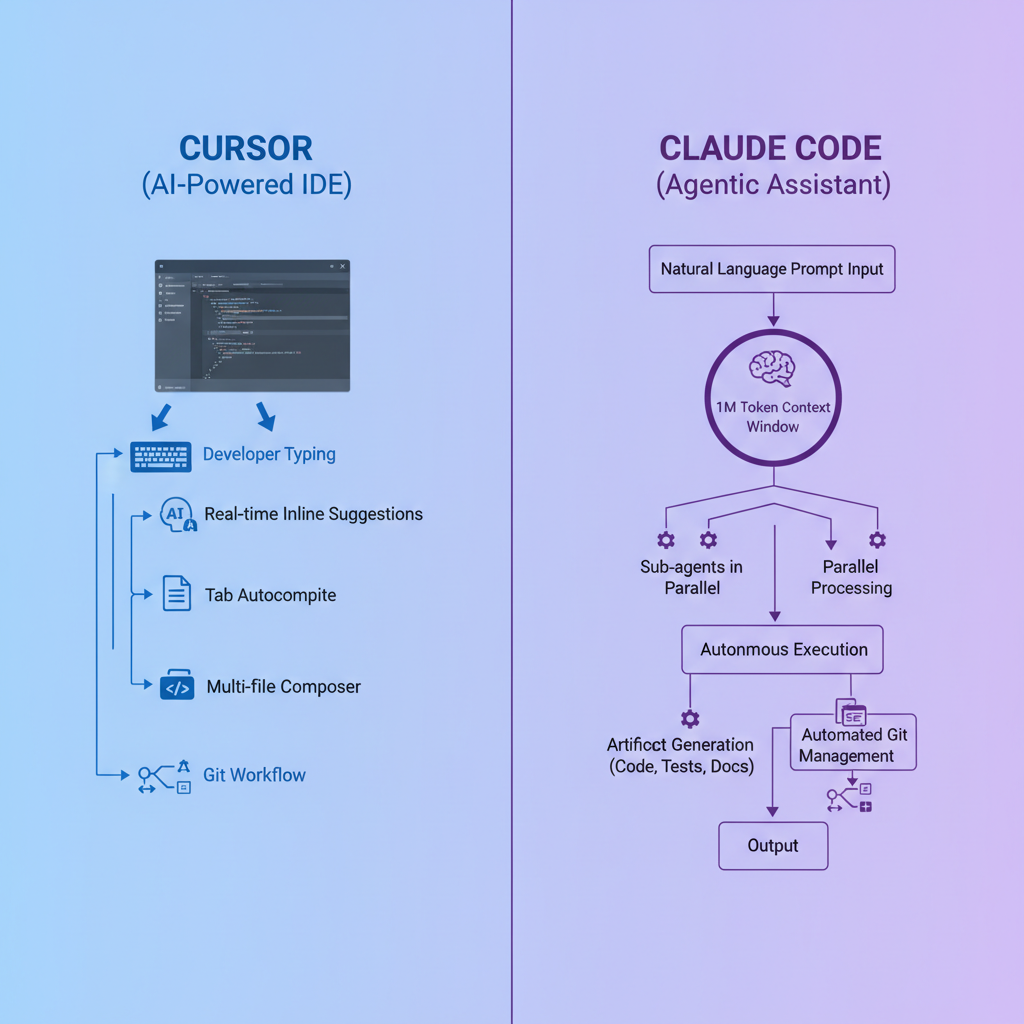
What Are Cursor and Claude in 2026?
Cursor and Claude lead the pack of AI coding tools 2026 has to offer. Cursor's an AI-boosted IDE, basically VS Code on steroids. It slips right into your setup, offering code suggestions and fixes as you type. No need to switch tabs or apps, it's all there in your editor.
Claude, from Anthropic, plays a different game. Think of it as a smart agent that tackles big coding jobs via plain English instructions. It can juggle massive codebases thanks to its huge context window, understanding connections across files that others miss. Both have grown since last year: Cursor stays flexible with any AI model you plug in, Claude amps up its independent thinking for tougher problems.
Cursor keeps things instant and embedded. Claude goes agentic, running tasks in the background, handling Git, even splitting work across sub-agents. Developers love how they speed up building software. But yeah, the right choice hinges on your style, quick edits or full overhauls?
Cursor vs Claude: How Do Their Features Stack Up?
Both nail basics like autocomplete and edits, but they pull apart on the details. Cursor's tab-to-accept suggestions and real-time assistance make routine changes a breeze. Git flows? Seamless, right in the IDE.
Claude fights back with natural language magic. Tell it to explain code, plan a feature, or refactor, and it delivers. That giant context window means it sees the whole project, not just snippets. Agent features cut manual grunt work, like auto-executing changes or parallel processing.
Cursor lets you swap models for the perfect fit per task. Claude sticks to its strengths in consistent, big-picture handling. Daily grind? Cursor ramps your speed. Architecture puzzles? Claude's your pick. Ever wonder why one feels faster? It boils down to how they match your habits.
Do Benchmarks Prove the 3x Speed Claim?
Numbers don't lie, but context does. Recent tests show Cursor pulling ahead on simple tasks, think faster completions for everyday code. Claude takes the lead on complex ones, where it navigates files autonomously for cleaner results.
| Metric | Cursor | Claude |
|---|---|---|
| Simple tasks | Faster inline edits | Solid, but less instant |
| Complex refactors | Good with multi-file tools | Excels with full context |
| First-pass accuracy | Strong for quick wins | Edge on big projects |
Real teams echo this. Large engineering groups report output jumping dramatically with Cursor's IDE speed, holding steady on bugs. Claude shines in planning phases, saving hours on refactors. Latency? Cursor for snappy responses, Claude for depth. No magic 3x everywhere, but pair them right, and you'll feel the boost. What's your bottleneck, speed or smarts?
Cost Breakdown: Which Offers Better Value?
2026 pricing keeps both in reach. Cursor Pro runs a flat $20 a month, predictable for heavy hitters logging 40+ hours weekly. Claude's also $20 base, but adds usage fees for those intense sessions.
| Plan | Cursor | Claude |
|---|---|---|
| Monthly Cost | $20 flat | $20 + usage |
| Best For | Daily volume | Sporadic deep work |
Crunch the math: Cursor wins for consistent grinders, scaling without surprises. Claude pays off when agentic power cuts big jobs short. Teams lean Cursor for easy rollout; solos mix both via APIs. Bottom line? Both crush ROI if you match usage to plan. Imagine reclaiming weekends, worth $20?
What Developers Actually Say About AI Productivity
Skip the hype, listen to coders. One massive tech team saw code output triple using Cursor, no quality drop. Indies rave about its debug shortcuts and flow for solo projects.
Claude converts on big builds. Devs highlight reliable planning and speed on knottier tasks. Cursor? Feels precise, like a sharp knife. Claude? A full toolbox for overhauls.
Watch outs: Both hallucinate sometimes, but Claude's context helps. Legacy code? Cursor integrates smoother. Smart folks blend them, Cursor all day, Claude for strategy. Users blending report the biggest leaps. Sound familiar?
Cursor vs Claude: Pick the Winner for Your Workflow
Solo speed demon? Cursor's inline magic and proven scale make it king. Wrestling complex apps? Claude's context and agents handle the heavy lifting.
Best of both: Cursor's model swaps let you tap Claude inside it. Start with Cursor Pro, add Claude for those think-tank moments. Free trials are your friend, test drive and see.
Lightning edits or deep dives? Grab the tool that fits, and watch your shipping speed soar in 2026. Links below, dive in and level up your AI for developers game today.
Related Articles

Claude Cowork macOS Agent: 30-Day Building in Public AI Experiment Results
Real metrics from running Anthropic’s Claude Cowork daily on macOS for automating developer tasks and side hustle updates.

Using AI Automation to Cut 90% Repetitive Developer Tasks in 2026 Workflows
See how eliminating the first 90% of boring repetitive work with AI automation freed up hours daily for developers focused on high-value coding and side projects.

Building My First Multi-Agent System with Google’s 1-Hour Agentic Engineering Course
Step-by-step notes from following Google’s free agentic course to wire short-term memory, loops, and MCP-style agents for real automation tasks.