
AI Side Project: Build a Browser Agent That Posts Twitter Threads Autonomously

AI Side Project: Build a Browser Agent That Posts Twitter Threads Autonomously
Launch your next AI side project in under an hour: a browser agent powered by Hermes that autonomously crafts and posts Twitter threads, revolutionizing your AI automation workflow.
By the end of this guide, you'll have built, tested, and deployed a fully functional AI agent using Hermes for Twitter thread automation. It's perfect for developers seeking practical AI projects to showcase while building in public.
What Is Hermes? The Framework That Makes AI Agents Reliable for Devs
Hermes is an open-source framework built for developers who want reliable AI agents with structured reasoning baked in. Check out the Hermes Agent GitHub repo, the latest version adds multi-agent support through a Kanban-style board. Agents grab tasks, work in parallel, and pass off handoffs just like a dev team.
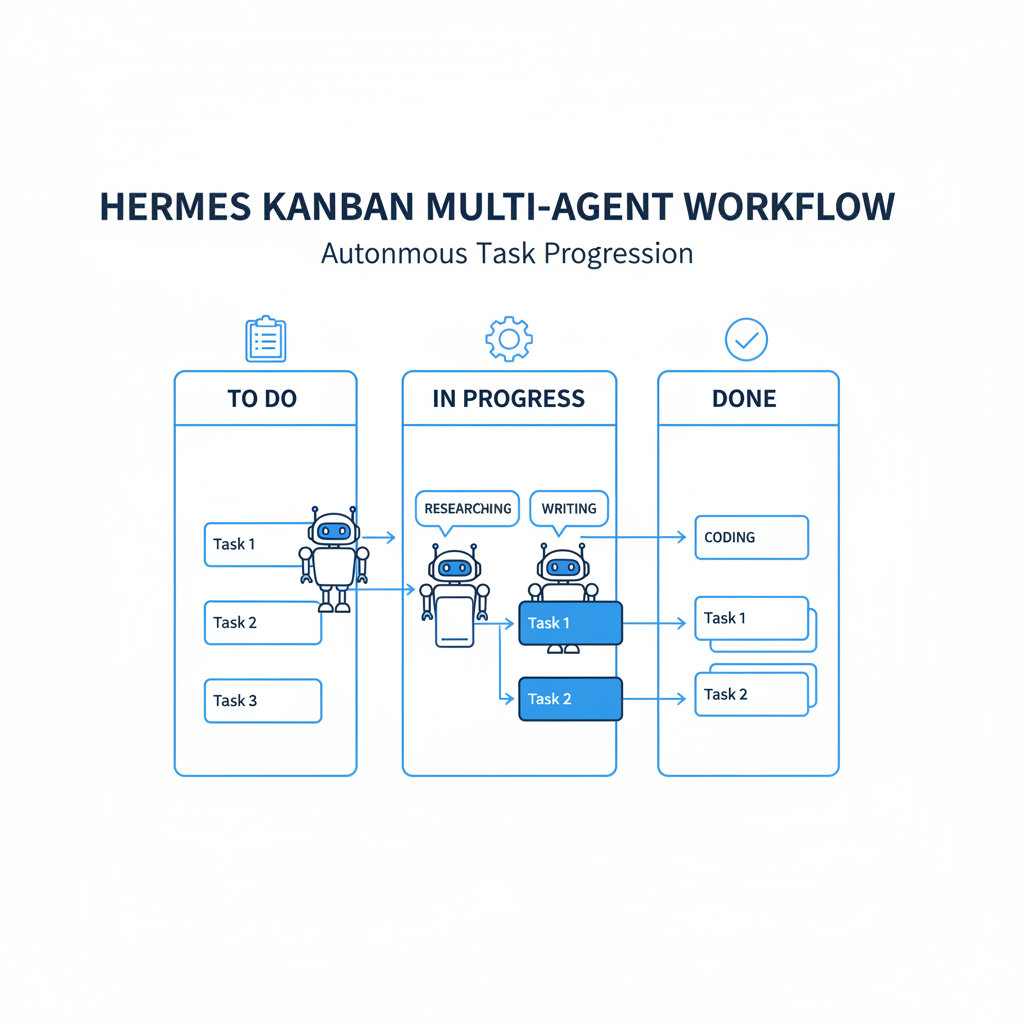
This setup fits complex automations perfectly, like generating and posting Twitter threads.
What makes Hermes great for intermediate developers? It handles browser automation without the flaky scripts that plague most setups. The docs spell it out: automate clicks, form filling, scraping, and multi-step workflows smoothly. Add a built-in learning loop, and your agent picks up new skills from experience. Run it a few times, and it gets sharper at edge cases, like Twitter's surprise page changes.
Hermes plays nice with big models, OpenAI's GPT-4, Anthropic's Claude, Google's Gemini. Pick what suits your budget. It's developer-friendly too: MIT License lets you fork and tweak freely. An active GitHub community backs it, and the quickstart gets you running fast. For AI side projects, this means autonomous agents that feel ready for the real world from day one.
Why Build a Twitter Thread Agent? It's the Perfect AI Side Project
Twitter threads mean research, writing, and careful posting. That chews up hours when you're balancing a day job. A Hermes agent takes a topic, researches it through the browser, drafts a tight thread, and posts it all on its own. Time saver? Sure. But it's also killer for building in public. Post your agent's work right there on Twitter, share the build journey, and watch the likes roll in.
The beauty? Scalability and easy entry. Kick off with Twitter, then tweak for LinkedIn or Reddit using the same bones. No ML PhD needed, just basic development skills and decent prompting. Stack the wins: automate content for your brand, experiment with agent patterns for sales or support, build skills employers crave.
Think about your workflow. Manual threads take considerable time. With the agent, this process is significantly faster. Hermes' learning loop polishes outputs over time, no extra work from you. Forget hype. This project gives real payoff: a live portfolio piece that wows recruiters and collaborators. The side project with actual dividends in skills and spotlight.
Quick Setup: Get Your Hermes Environment Running Smoothly
Hermes setup skips the headaches, matching its promise of under-10-minute installs. Follow the quickstart guide to set up your project directory and install dependencies.
Install Hermes following the quickstart guide. This brings the latest features, including Kanban for task juggling. The setup supports browser automation on Chrome, Edge, Brave, Arc, per the docs. Cross-browser reliability for Twitter? Check.
Lock down secrets in .env: Twitter username/password (browser login keeps it simple, skip API for now). Toss in your AI key, OpenAI, Anthropic, Gemini all fit. Like this:
HERMES_MODEL=anthropic/claude-3.5-sonnet
OPENAI_API_KEY=your_key_here
TWITTER_USERNAME=your_handle
TWITTER_PASSWORD=your_pass
Set a system prompt: "You're a Twitter thread pro. Whip up 5-10 tweets on [topic], engagement-optimized." Follow the quickstart to test. If it chats back right, you're golden. This setup leverages Hermes' browser automation capabilities for full agent autonomy.
Pro tip: Test the env early. Run a dummy goal like "Summarize AI news." Smooth? Dive deeper.
Design and Code Your Core AI Agent
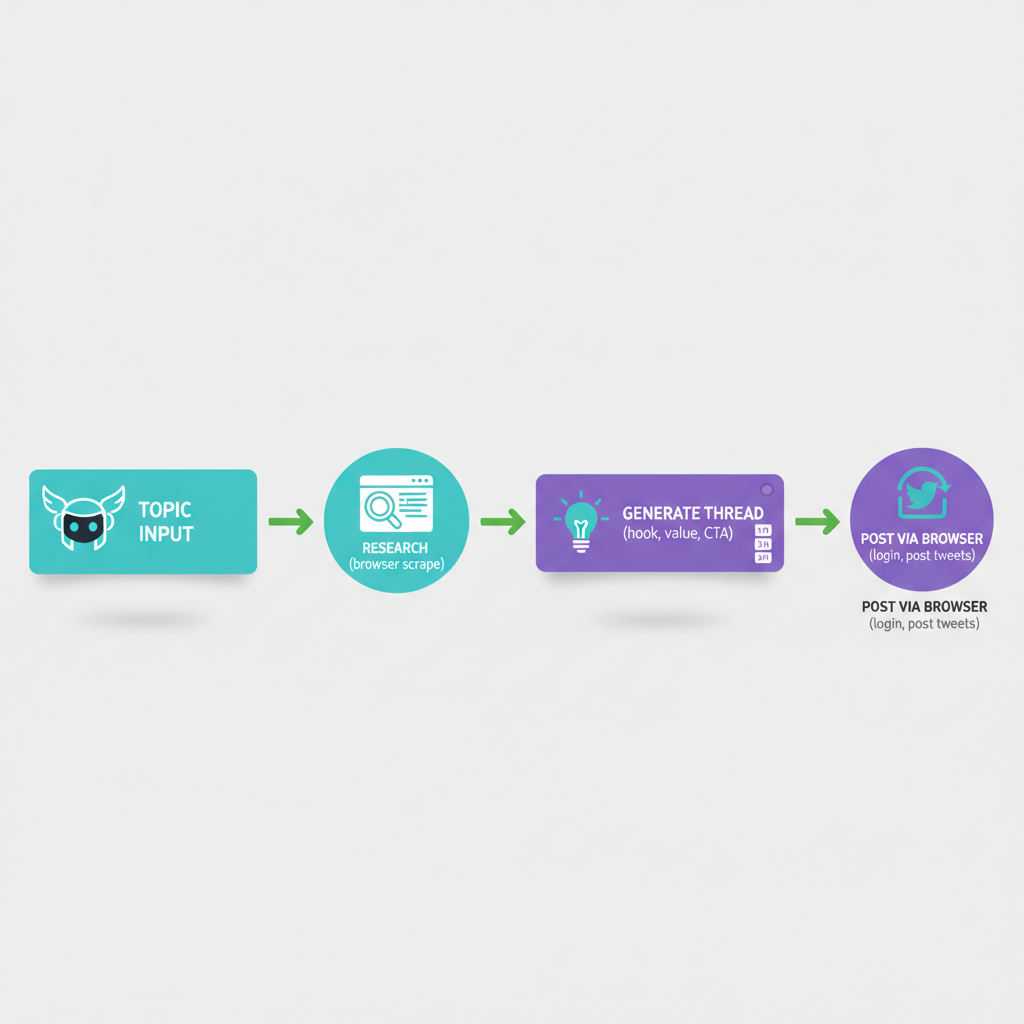
Goal: Input a topic, research, generate thread, post via browser. Hermes tools make it click, custom functions for content and nav.
Prompt smart: System says, "Research [topic] by scraping. Outline 5-tweet thread: hook, value, CTA. Cap at 280 chars." Learning loop saves winners for next time.
contentGenerator hits the model for drafts. Flow: Tweet 1 hooks 'em, 2-4 pack value, 5 CTAs. Research? Agent scrapes solo. Twitter tool logs in and posts, details coming.
Initiate the agent with a goal like 'Create and post thread on AI agents'. Kanban splits it: research agent, writer, poster. Parallel work, no jams. Test loops hone prompts, add 1/5, 2/5 numbering for polish.
Want more? Expand tools. Say, a fact-checker that cross-references sources. Keeps threads credible.
Wire in Browser Automation with Hermes
Hermes enables headless Twitter mastery. Define twitterNavigator tool to handle login, posting, and other actions using browser automation capabilities like clicks, form filling, scraping, and multi-step workflows on Chrome, Edge, Brave, and Arc.
Hermes calls it on the fly: research, generate, then nav: login, post. Docs back multi-step flows, form fills included.
CAPTCHAs? Prompt the agent to pause and ping you, or hook a solver. Rate limits? Waits and retries handle it. Run Brave for privacy. Learning adapts to UI shifts, Twitter's always changing.
Tweak for threads: After each post, wait for the new composer. Makes it chain perfectly.
Test, Deploy, and Keep Tabs on Your Agent
Test locally following the quickstart with a topic like \"Hermes AI tips\". Logs show reasoning, spot failed posts easy. Tweak prompts if threads miss the mark. Community shares prompt hacks.
Deploy: GitHub push, serverless host. Set env vars safe. Replit shines for prototypes and shares. Queue topics, Kanban scales it.
Monitor logs or console. Track posts and engagement by hand first. Errors? Hermes retries tools. Forums fix model quirks.
Scale monitoring: Log successes to a file, review weekly. Spot patterns, refine.
Best Practices: Nail AI in Public and Scale Your Automation
Prompt like a boss: Chain-of-thought (\"First research, then outline\") nails consistency. Tag #AIGenerated, ethics matter, trust follows.
Cap at 1-2 runs weekly, honor ToS. Share the build: \"Day 1: Agent drops first thread! Code: [link].\" Community feedback speeds you up.
Scale: Add image agent (DALL-E), reply bot. MIT lets you open-source bold. Focus value, skip spam.
One more: Version control prompts in Git. Track what works.
Congratulations. You've got a powerhouse AI side project. Fire up that Hermes agent, automate those threads, build in public. Who's knows, your next collab or gig starts with one post. Get coding.
Related Articles

Claude Cowork macOS Agent: 30-Day Building in Public AI Experiment Results
Real metrics from running Anthropic’s Claude Cowork daily on macOS for automating developer tasks and side hustle updates.
Using AI Automation to Cut 90% Repetitive Developer Tasks in 2026 Workflows
See how eliminating the first 90% of boring repetitive work with AI automation freed up hours daily for developers focused on high-value coding and side projects.

Building My First Multi-Agent System with Google’s 1-Hour Agentic Engineering Course
Step-by-step notes from following Google’s free agentic course to wire short-term memory, loops, and MCP-style agents for real automation tasks.