
Using AI for Developers: My 7-Day Experiment with Claude and Copilot for Side Project Coding

Using AI for Developers: My 7-Day Experiment with Claude and Copilot for Side Project Coding
Last week, I jumped into using AI for developers by challenging myself to build a side project entirely with Claude and Copilot. What started as a simple productivity experiment turned into a game-changer. It cut my coding time in half and sparked ideas for real income.
By the end, you'll have a firsthand 7-day blueprint for weaving Claude and Copilot into your dev workflow. Actionable tips, pros/cons, productivity hacks, strategies to amp up your AI side projects for income.
What Are Claude and Copilot? Essential AI Tools for Developers
Let's knock out the basics fast. Claude, from Anthropic, is a conversational beast that crushes reasoning tasks. Think code generation, debugging that makes sense, high-level architecture advice. It's like a senior dev chatting over coffee, 24/7.
Copilot, GitHub's creation, lives in your IDE. Autocomplete wizard for real-time suggestions, churning boilerplate faster than you can type "hello world." No staring at blank screens wondering about auth middleware structure.
Together? Perfect combo for using AI in work. Claude handles big-picture planning, mapping app flows. Copilot tackles execution, speeding keystrokes. Devs swear by this split. After my experiment, I see why. Solo coding becomes tag-team.
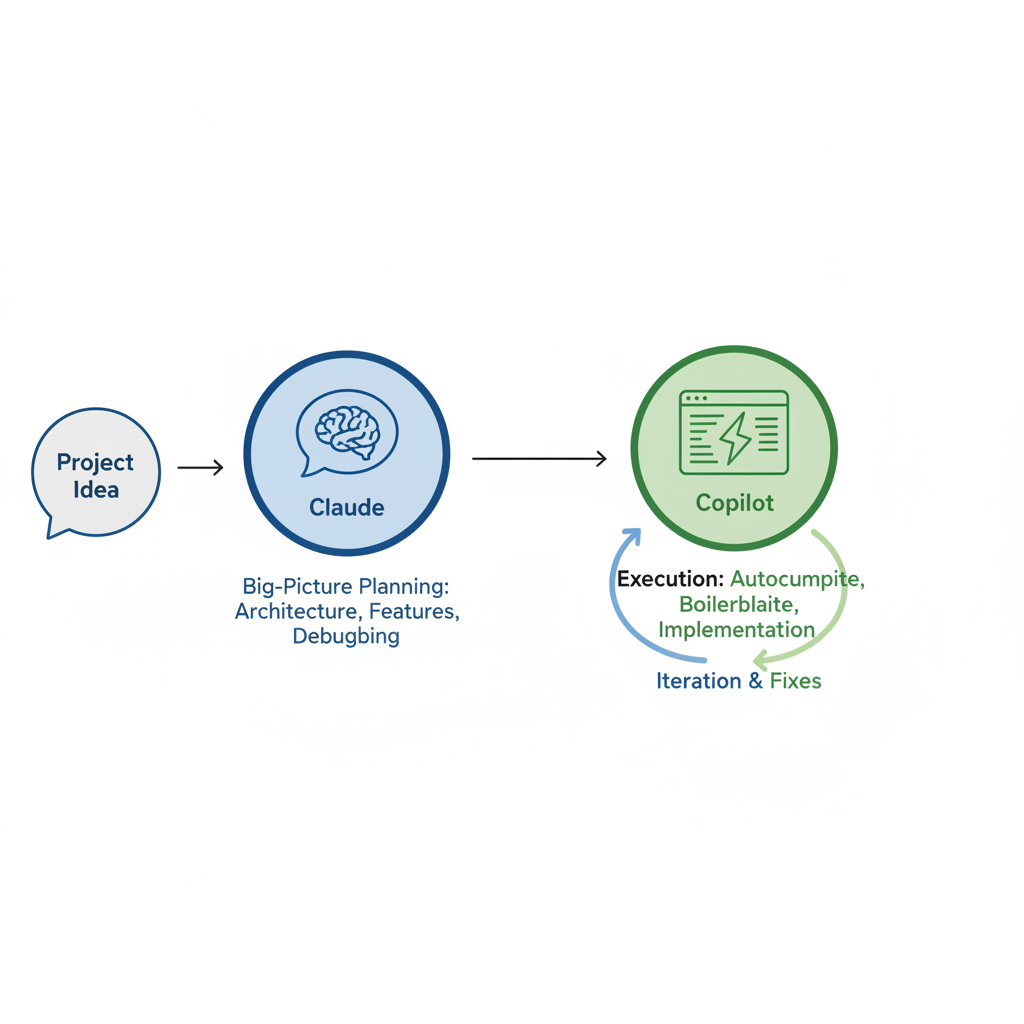
Day 1: Setting Up Your AI Developer Workflow for Side Projects
Day one hit like caffeine. Picked a straightforward SaaS side project: task tracker with user auth, drag-and-drop boards, basic analytics. Monetizable with premium features later.
Setup dead simple. Fired up VS Code, installed Copilot extension, linked GitHub. Anthropic site for Claude Pro. Under 30 minutes.
First: Chatted Claude on architecture. "Design full-stack task tracker: Next.js backend, React frontend, Prisma DB. Auth, real-time updates." Detailed blueprint in minutes. Copilot auto-filled login component.
Compared to manual? Saved two hours. No fumbling docs or boilerplates. You're thinking, "Too easy." It was. Excitement kicked in.
Days 2-4: Real-World AI Productivity Wins in Coding
Accelerated fast. Day two, Claude generated API endpoints for tasks, boards. Pasted into Next.js routes, tweaked one line, worked. Copilot handled 70% frontend React: hooks, Tailwind styling.
Day three, debugging heaven. Normally four hours on Next.js hydration error. Claude explained stack trace step-by-step, suggested useEffect fix. Copilot implemented. 30 minutes total.
Day four, ideating features. Claude suggested premium tiers: team collab, AI task prioritization. Iterations down from days to hours. Three times faster. AI streamlined everything, boosting productivity, opening income from side projects.
Claude vs Copilot: Which AI Tool Wins for Developers?
Showdown time. How they stack up:
| Aspect | Claude | Copilot |
|---|---|---|
| Strengths | Complex reasoning, planning, architecture | Speed: autocomplete, boilerplate, tests |
| Usability | Chat-based (browser/app), copy-paste code | Invisible in IDE (VS Code, JetBrains) |
| Cost | ~$20/mo pro | ~$10/mo pro |
| Best For | Strategy, big-picture | Daily grind, real-time coding |
Claude excels at reasoning, planning. Refactor for scale? Database schemas? Your guy. Copilot: speed demon, anticipates lines, generates tests.
No winner. Claude for strategy, Copilot for grind. Hybrid crushed my experiment. This AI tools review shows: pick by bottleneck, ditch solo coding.
Challenges and Limitations of AI Automation in Side Projects
Not all sunshine. AI hallucinates: fake libraries, buggy logic. Fixed 20% myself. Claude's context caps long sessions, so chunk prompts.
Biggest risk? Over-reliance. Human eyes needed for production, especially security. Bad prompt, chase ghosts.
Workarounds: Iterative prompts, "Fix error," "More efficient." AI drafts, you review. Expectations kept me sane. Wins beat hiccups.
Day 7 Results: Boosting Income with AI for Developers
MVP done. Deployed Vercel minutes. Shared screenshots on Twitter, building in public. 20 beta sign-ups overnight.
Usually three weeks. AI: seven days, 60% savings. Task tracker? Eyeing $500/month passive. Scalability freed variants. AI for developers turns side projects into earners.
5 Actionable Tips to Start Using AI for Work Today
- Master prompts: Specific. "React hook: infinite scroll, error handling" beats "Make scrolling work."
- Workflow ritual: Mornings Claude planning. Afternoons Copilot coding.
- Track metrics: Time saved, bugs. Mine: 15 hours by day five.
- Start small: Todo clone first. Scale later.
- Build in public: Tweet progress. Feedback rocket fuel.
Tips from trenches. Try one today.
My experiment proves: Claude, Copilot rocket AI side projects. Grab keys, pick project, transform workflow. First AI-powered build? Comments. Build in public together!
Related Articles

Claude Cowork macOS Agent: 30-Day Building in Public AI Experiment Results
Real metrics from running Anthropic’s Claude Cowork daily on macOS for automating developer tasks and side hustle updates.

Using AI Automation to Cut 90% Repetitive Developer Tasks in 2026 Workflows
See how eliminating the first 90% of boring repetitive work with AI automation freed up hours daily for developers focused on high-value coding and side projects.

Building My First Multi-Agent System with Google’s 1-Hour Agentic Engineering Course
Step-by-step notes from following Google’s free agentic course to wire short-term memory, loops, and MCP-style agents for real automation tasks.