
AI Tools Review: Which Local Agent Setup Saves the Most on Cloud Costs

AI Tools Review: Which Local Agent Setup Saves the Most on Cloud Costs
Staring at another cloud bill that makes you wince? You're not alone. Developers and teams keep running into the same problem: those per-token charges add up fast once projects grow. This ai tools review checks whether local agent setups can trim the fat while keeping things fast and private.
Why Cloud AI Bills Keep Rising
Cloud pricing looks simple at first, per token or per hour. Then the extras creep in. Data transfer fees, latency drag, and the extra layers you need for compliance all push the total higher. What starts as a few dollars a month turns into real money once token counts climb and more people join the workflow.
Privacy rules make it worse. You end up paying for audits, encryption, and extra controls just to stay on the right side of regulations. On top of that, platforms like Lindy AI and Relevance AI tack on monthly fees between $30 and $200, while Zapier AI begins at $29.99. Those charges stay predictable but they grow with every added user or workflow.
OpenClaw takes a different route with no platform fee at all. You only cover hosting, roughly $5 to $20 a month based on their data. That gap shows why more teams are testing on-device options instead of locking into another subscription.
Three AI Agent Deployment Models Compared
Three main ways to run these agents exist right now. Pure on-device keeps everything on your laptop, workstation, or phone. No calls leave the machine for tasks the local model can handle. Hybrid setups run light work locally and send only the heavy lifting to the cloud. Cloud-only sends every request out to remote APIs.
Tools in the on-device camp include Open Minis, which works with Claude, GPT, Gemini, OpenRouter, and custom endpoints. Ruuh runs on Android 7 and up through Termux. MobileClaw brings 29 native tools that talk directly to Android features. Hybrids mix these local pieces with selective cloud calls, while cloud-only stays the default most teams still use.
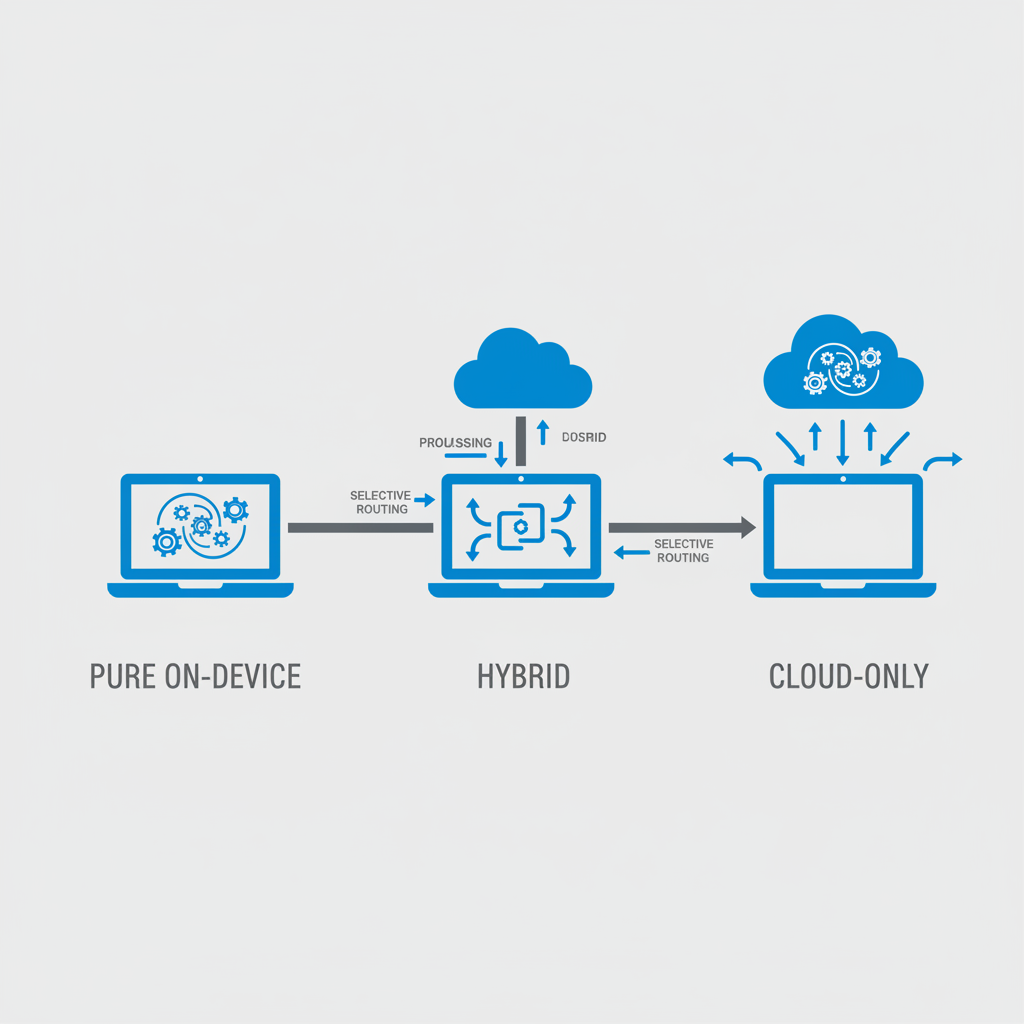
The choice between these models comes down to how much hardware you have and how often you hit complex tasks. Pure local wins on privacy and zero per-token costs. Hybrid gives flexibility when a job needs more power than your device can spare.
Monthly Cost Analysis: Local vs Hybrid vs Cloud
Hardware is the big upfront hit with on-device setups. Buy the GPU or NPU once and the per-token meter stops running. After that, OpenClaw's $5–$20 hosting bill stays low compared with the $30–$200 range from Lindy AI or Relevance AI. Zapier AI sits at $29.99 to start.
At higher daily token volumes the cloud bills climb fast. A hybrid approach cuts that curve by handling routine prompts locally and only paying for the tough ones. Over a year the math favors on-device or OpenClaw setups because platform fees stay near zero while cloud costs keep scaling with usage.
Think about a typical developer workflow. If you run a few hundred prompts a day on simple tasks, local inference pays for itself quickly. When you occasionally need a heavy model for code review or long context, the hybrid path still beats sending everything out.
AI Tools Review: How to Set Up a Local AI Agent in Under an Hour
Open-source runtimes make the first install painless. Open Minis gives you one interface for multiple providers. One-command scripts check your environment and pull the needed pieces on both desktop and Android.
Ruuh needs Termux on Android 7+, then the agent starts with almost no extra setup. MobileClaw already includes those 29 built-in tools that hook straight into device functions. Swapping your code to point at a local address instead of a remote endpoint takes minutes. Most people finish the first working test inside the hour.
The real trick is testing with prompts you actually use every day. Start small, watch memory and speed, then adjust which tasks stay local and which ones you still route out.
Performance and Privacy Trade-offs of Each Setup
Local runs can feel faster once the model sits on your machine. One reported setup hit 1.61 times end-to-end speedup with no drop in accuracy. Cutting the initial system prompt down by a factor of six also helps memory and latency.
Privacy improves because nothing leaves the device. You skip the data transfer step entirely. The trade-off shows up in maintenance. You handle model updates yourself and keep an eye on hardware temps. Hybrid setups split the difference: they keep everyday work private and fast while still letting you reach bigger models when needed.
Task type matters here. Simple classification or short chat stays local without issue. Long reasoning chains or very large context windows still benefit from cloud fallback in a hybrid setup.
Which Local Agent Setup Wins on Cost?
For most developers the pure on-device route built around OpenClaw or MobileClaw comes out ahead. Zero platform fee plus low hosting gives the lowest ongoing spend while still supporting the same endpoints you already know. When you hit occasional high-complexity work, a hybrid using Open Minis locally plus selective cloud calls still beats full cloud pricing.
Quick checklist for your own situation: lower daily volumes lean toward pure on-device. Higher volumes or strict privacy rules point to hybrid. Teams without spare hardware should stack OpenClaw hosting costs against Lindy AI, Relevance AI, and Zapier AI before deciding.
A well-chosen local agent configuration can deliver substantial reductions in cloud spend for typical developer workloads. Run your own test deployment, track what you would have spent on tokens for a month, and see the difference on your hardware.
Related Articles
Using AI Automation to Cut 90% Repetitive Developer Tasks in 2026 Workflows
See how eliminating the first 90% of boring repetitive work with AI automation freed up hours daily for developers focused on high-value coding and side projects.

Building My First Multi-Agent System with Google’s 1-Hour Agentic Engineering Course
Step-by-step notes from following Google’s free agentic course to wire short-term memory, loops, and MCP-style agents for real automation tasks.
Haiku vs Opus for Real Developer Tasks: 5-Run Coding Benchmarks That Surprised Me
Detailed results comparing smaller models like Haiku against Opus on actual merged bug fixes and daily coding work for developers.