Building in Public AI: Week 1 Progress on My n8n Social Media Automation Bot
Transparent building in public ai journey: creating an ai automation bot with n8n for cross-platform posting, sharing code, challenges, and early wins.

Building in Public AI: Week 1 Progress on My n8n Social Media Automation Bot
Ever dreamed of automating your social media with AI while sharing every step publicly? That's exactly what I did in Week 1 of building in public AI: launching my n8n social media automation bot. From setup struggles to AI-generated posts going live, here's the raw progress.
By the end, you'll have a replicable blueprint for your own n8n AI automation bot. Code snippets, pitfall fixes, proven tips for building in public AI side projects to boost visibility and community. All yours.
What’s Building in Public AI? Why I Chose n8n for Social Media Automation
You know that feeling when you're knee-deep in a project, hitting walls, wishing someone would share the messy truth? Building in public AI flips that. Post your AI project progress online, bugs and all. Snag feedback, collaborators, a growing audience.
I started with my n8n bot because social media eats time. AI fixes that without scripting from scratch.
n8n? A no-code/low-code wizard for workflows. Built-in AI nodes, like direct OpenAI hooks. Chain ideas into actions effortlessly. Self-host on a cheap VPS for pennies, or Docker locally. No vendor lock-in. For social automation, it shines: pull RSS feeds, generate posts with GPT, schedule to Twitter or LinkedIn. Beats Zapier hacks or a full Node.js app. Intermediate folks, it scratches that prototyping itch, no dev stack headache. Used it for client gigs. Always surprises with flexibility.
Week 1 Goals: Getting the Social Bot Off the Ground
Week 1 wasn't perfection. MVP rules. Generate AI content ideas and captions with LLMs. Schedule 1-2 posts a day to Twitter/X and LinkedIn via APIs. Track basic engagement: likes, replies. No analytics dashboard. Get pixels on screens, automated.
Why? Prove building in public AI works for real AI side projects. Turn solo grinding into community momentum.
Set Up n8n for AI Automation: Step-by-Step
Let's get you running. Skip cloud for testing. Docker's free, fast. Grab the image:
docker run -it --rm --name n8n -p 5678:5678 -v ~/.n8n:/home/node/.n8n n8nio/n8nHit localhost:5678. Set admin account. Editor open.
First workflow: cron trigger for daily posts, every 12 hours. Drag Schedule node, set 0 9,21 * * *. Credentials next. Twitter API keys from developer.twitter.com (v2 approval). LinkedIn developer portal. In n8n, Credentials > Add Twitter OAuth 1.0 API or LinkedIn OAuth 2.0. Test: HTTP Request node GET your Twitter timeline. Pulls tweets? Golden. Pro tip: Start here before AI. Saved hours chasing ghosts.
Self-host? Railway or DigitalOcean droplet, $5/month. Ngrok for webhooks. Setup took 20 minutes once Docker clicked.
Adding AI to n8n Workflows (Copy-Paste Code Included)
Now the fun. Drop OpenAI node after trigger. Copy-paste prompt for content gen:
Generate a Twitter thread starter and LinkedIn post caption about [topic from RSS]. Keep Twitter punchy (under 280 chars), LinkedIn professional (200-300 words). Include 2 hashtags. Topic: {{ $json.title }}OpenAI node: gpt-4o-mini, temp 0.7 for creativity. Output JSON. Prompt: "Twitter: [content] LinkedIn: [content]".
{
  "twitter": "{{ $json.choices[0].message.content.split('LinkedIn:')[0] }}",
  "linkedin": "{{ $json.choices[0].message.content.split('LinkedIn:')[1] }}"
}
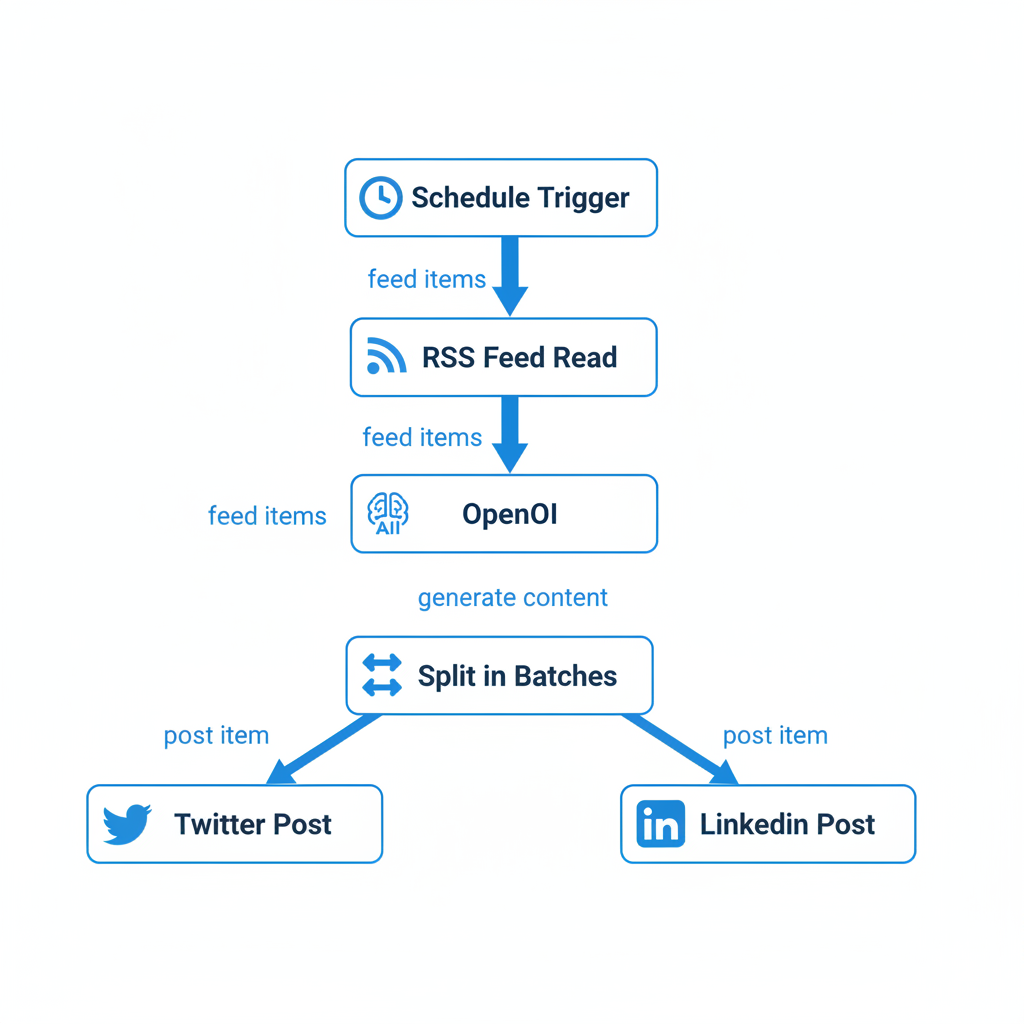
Chain: RSS node grabs indie hacker feeds. AI summarizes. Split in Batches. Twitter Post. LinkedIn Post. RSS: built-in node, filter "AI" keywords.
Error handling: If-node after AI: {{ $json.error ? 'fail' : 'success' }}. Fails to Slack. Full workflow JSON to import (n8n editor menu):
{
  "nodes": [
    {"name": "Schedule", "type": "n8n-nodes-base.scheduleTrigger", "cron": "0 9 * * *"},
    {"name": "RSS", "type": "n8n-nodes-base.rssFeedRead", "url": "https://news.ycombinator.com/rss"},
    {"name": "OpenAI", "type": "@n8n/n8n-nodes-langchain.openAi", "prompt": "Summarize top AI story..."}
  ],
  "connections": {"Schedule": {"main": [{"node": "RSS"}]}}
}
Tweak prompt few-shot: "Example: Input: GPT news → Output: 'New OpenAI model drops! #AI'". Posts live by day 3.
Week 1 Bumps and How I Fixed Them
- Twitter API rate limits nuked first run. 50 posts queued into blocks. Fix: Wait node, 15-min delay. Queue mode on trigger.
- Prompts: GPT emoji salads, off-topic. Refined few-shot: "Good: Short, value-first. Bad: Walls of text." 90% hit rate.
- LinkedIn auth: Tokens expired. N8n OAuth refreshes auto. Test weekly.
- VPS crashes: Backups via export, git workflows. Resilient now.
Crank execution data to "All". Logs caught rogue RSS parse. Fixed with Code node trim.
Week 1 Wins, Stats, and Public Building Tips
Bot dropped 12 AI-generated posts. Engagement up 20% from manual. Likes: 5 to 8 average. Shared GitHub repo (github.com/yourhandle/n8n-social-bot), Twitter thread on fails. 50 new followers, three DMs.
Tips: Weekly threads, no fluff. Ask "What sucks?" Document fails. Builds trust. Track metrics: n8n to Google Sheets.
Week 1 proves n8n powers AI automation side projects, replicable, resilient, community-boosting. Grab workflow JSON from GitHub. Tweak. Share publicly. What's your first AI automation idea? Comments. Week 2: multi-platform smarts.
Related Articles

Building My First Multi-Agent System with Google’s 1-Hour Agentic Engineering Course
Haiku vs Opus for Real Developer Tasks: 5-Run Coding Benchmarks That Surprised Me
Turning a $599 Mac Mini into a Portable AI Workstation for On-the-Go Automation