
Building My First Multi-Agent System with Google’s 1-Hour Agentic Engineering Course
Developers building real ai automation no longer need weeks of theory, Google’s 1-hour Agentic Engineering Course shows how to ship a working multi-agent system with ADK in a single afternoon. The course structure emphasizes hands-on implementation over lectures, letting developers move from setup to a functional prototype that handles coordinated tasks across multiple agents. This method fits developers who want to learn ai practical techniques that translate directly into ai productivity gains on their own projects.
What is Google’s Agent Development Kit (ADK)?
Google’s Agent Development Kit serves as a dedicated framework for constructing multi-agent systems that intermediate developers can apply to production-grade automation. It supports Python, TypeScript, Go, and Java, which means teams can integrate it into existing codebases without forcing a language switch. The framework stays model-agnostic, allowing the same agent logic to run against Gemini, Claude, Ollama, vLLM, or LiteLLM depending on cost, latency, or data-residency needs.
Core components inside ADK include Agents for task definition, Tools for external actions, Callbacks for custom logic, Session Management for state handling, Memory for context retention, Artifact Management for output tracking, Code Execution for inline computation, Planning for goal decomposition, Models for inference routing, and Events for observability. These pieces work together so an agent can receive a user request, consult memory from prior turns, invoke a tool through MCP, and return a structured result without the developer writing boilerplate orchestration code.
For developers focused on ai for developers, the value shows up in reduced boilerplate. Instead of wiring together separate LLM calls and state stores, ADK provides the scaffolding that keeps agents aligned on shared goals. The 1-hour course demonstrates this by walking through a minimal multi-agent setup that already includes session tracking and tool registration, giving learners a concrete starting point they can extend rather than a theoretical diagram.
Understanding ADK’s Workflow Agents
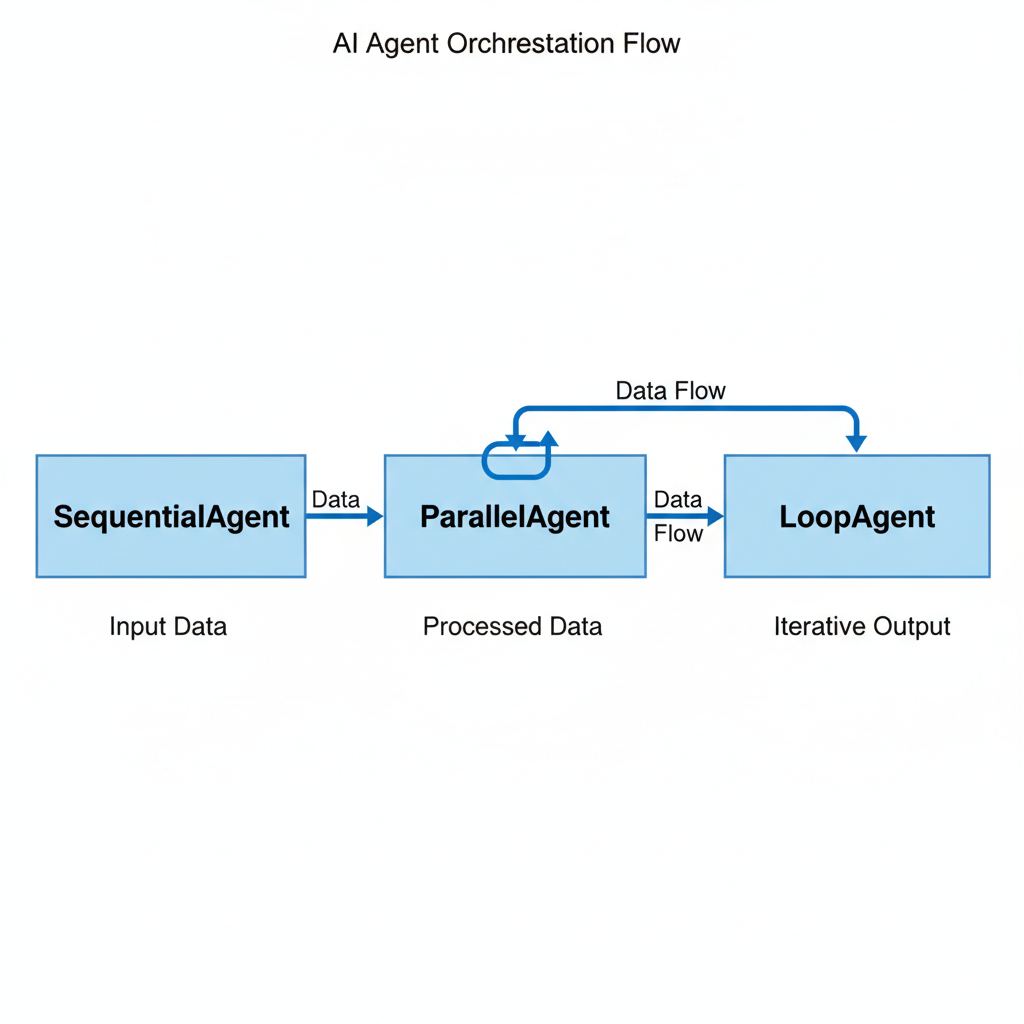
ADK includes three workflow agents that impose structure without repeated LLM intervention.
- SequentialAgent executes steps in a fixed order, so each agent receives output from the previous one and processes it predictably. This pattern suits pipelines where data must move through validation, enrichment, and formatting stages without branching.
- ParallelAgent launches multiple agents at the same time against the same input, then aggregates results once all branches finish. It reduces total latency on tasks that contain independent subtasks, such as running several searches or analyses concurrently.
- LoopAgent repeats an agent or sequence until a termination condition is met, which keeps behavior deterministic even on repetitive work like retry logic or iterative refinement.
These agents deliver deterministic behavior without constant LLM calls because the orchestration logic lives in the framework rather than inside model-generated plans. The course highlights this distinction by contrasting them with purely reactive agents that rely on the LLM to decide every next action. When predictability matters, as it does in most real-world automation, the workflow agents let developers encode the control flow once and let the system enforce it across runs.
How to Implement Short-Term Memory in ADK
Short-term memory in ADK lives inside the Session object, where it functions as the agent’s working buffer for the current conversation. Each turn the agent can read prior messages and state values stored in that session, then write updates that remain available to subsequent turns. This mechanism supports context-aware responses without requiring the developer to manage a separate cache.
During development, the InMemoryMemoryService keeps everything in process memory, which removes the need for external infrastructure while still demonstrating how agents retain details such as user preferences or intermediate results. When the session ends, the data disappears, making this service suitable for testing and rapid iteration.
For production environments the same interface accepts a DatabaseSessionService backed by SQL storage. Switching requires only a configuration change; the agent code that reads from or writes to the session stays identical. Implementing short-term memory therefore becomes a matter of choosing the service that matches the deployment stage rather than rewriting retrieval logic. The course uses this progression to show how agents maintain continuity across multiple user exchanges while keeping the implementation straightforward.
Connecting Agents to External Tools with MCP
MCP Integration in ADK provides agents access to external tools and data, enhancing their capabilities beyond the model’s training cutoff.
- Agents register MCP endpoints once, after which they can invoke remote APIs, execute searches across live indexes, or trigger code interpreters hosted elsewhere.
- The protocol handles authentication and schema validation so the agent receives structured responses it can pass directly into memory or the next workflow step.
- Developers gain the ability to combine local reasoning with live operations such as checking calendar availability, querying internal databases, or calling third-party services without embedding those details inside every prompt.
This integration dramatically expands what a multi-agent system can accomplish in practice. A single SequentialAgent chain can now pull fresh market data, analyze it with a ParallelAgent branch, and store outcomes through MCP without the developer managing HTTP clients or error handling for each source.
Best Practices for Deploying Multi-Agent Systems
Start development with in-memory services so iteration cycles stay fast and no external dependencies interfere with debugging. Once the agent logic stabilizes, migrate the session layer to DatabaseSessionService to gain persistence across restarts and better support for concurrent users.
Match workflow agents to task characteristics. LoopAgent fits repeated refinement cycles where the same logic runs until convergence, while ParallelAgent improves throughput on independent subtasks that would otherwise serialize.
Combine MCP tool registration with memory services so agents carry context forward while still reaching live data sources. This pairing produces autonomous behavior that remains traceable because both the memory state and tool calls surface through ADK’s event system. Testing the full stack against representative inputs before promotion helps surface edge cases in orchestration or tool response handling.
You now have everything needed to finish Google’s 1-hour course and immediately start shipping multi-agent systems that deliver measurable automation gains.
Sources
Related Articles
Claude Cowork macOS Agent: 30-Day Building in Public AI Experiment Results
Real metrics from running Anthropic’s Claude Cowork daily on macOS for automating developer tasks and side hustle updates.
Using AI Automation to Cut 90% Repetitive Developer Tasks in 2026 Workflows
See how eliminating the first 90% of boring repetitive work with AI automation freed up hours daily for developers focused on high-value coding and side projects.

Haiku vs Opus for Real Developer Tasks: 5-Run Coding Benchmarks That Surprised Me
Detailed results comparing smaller models like Haiku against Opus on actual merged bug fixes and daily coding work for developers.